The Homelab: Hardware and Architecture
If you become a frequent visitor of my logs, you’ll hear about my homelab quite often. It’s a rack in my basement that I built from scratch. Two Kubernetes nodes on a 25GbE fabric, five ZFS pools, and a firewall doing deep packet inspection on my WAN. It’s been up and running for over a year, and it’s my playground when I want to nerd it up and learn.
The inspiration for building a homelab came from a lovely gentleman named Kevin. He was THE guy when it came to networking at my old job. He built a vast majority of it, to be fair. He was a very nice guy, and we would always chitchat. He would tell me about all the cool projects he was on, and then he would go into the deep networking details from those projects. Almost all of it went over my head. Two years later, it still went over my head, so I decided I was going to learn networking. Networking is a unique technical skill to learn, since there aren’t typical ways to practice and I highly doubt my employer would let me practice on the company network. My solution was to build my own network via a homelab.
I’m someone who loves understanding how systems/technology work. I’ve also worked with infra hosted in the cloud, hosted on-prem, and hosted in various different hybrid setups. I always had the maintenance taken care of for me. I didn’t realize the amount of work it took to stand infra up or keep it in good shape. I always dealt with the infra after it was stood up. I decided to change that and to self-host. And boy, did I underestimate how much work it is. I solved a bug last week that had been in my firewall server since basically day one.
The rack
A 27U locking cabinet on casters in a basement corner, fed by two dedicated 20A circuits. Each circuit powers its own UPS and each UPS feeds its own PDU, so a tripped breaker or a dead UPS takes down half the rack instead of all of it.
| Position (top to bottom) | Device | Size |
|---|---|---|
| U1-U2 | Patch panel + cable management | 2U |
| U4 | Cisco Nexus 93180YC-FX, dual PSU | 1U |
| U5-U6 | Firewall (pfSense) | 2U |
| U7-U10 | Frontend node (K8s worker) | 4U |
| U11-U15 | Backend node (K8s control plane + worker) | 5U |
| U16-U19 | NAS (TrueNAS SCALE) | 4U |
| U24-U25 | UPS #1 | 2U |
| U26-U27 | UPS #2 | 2U |
| Power feed | Carries |
|---|---|
| Circuit A (20A) → UPS #1 → PDU #1 | Switch PSU 1, firewall, backend |
| Circuit B (20A) → UPS #2 → PDU #2 | Switch PSU 2, NAS, frontend |
The switch is the only box with dual power supplies, plugged into each UPS. It’s the one thing that can’t lose power. Every other machine is on a single circuit.
The compute lives in SilverStone rackmount cases. Consumer hardware in real rack cases gets me modern CPUs and GPUs without the noise and power draw of retired enterprise gear off eBay. The best part was that I already had the majority of the computer parts from my very normal 3 tower setup. The firewall, the rack, the cases, and the most painful part, the backend server, were new parts. The tradeoff, of course, is that I am running non-ECC parts under five ZFS pools, which means ZFS checksums are the only thing catching whatever the RAM lets through.
Four machines, four roles.
Firewall. 2U. Ryzen 5 7600X, 32GB DDR5, pfSense on a mirrored ZFS boot pair. Routing, VLANs, VPN, IDS/IPS, DNS. It’s sized like a server because it does server work: deep packet inspection on every WAN packet and recursive DNS for the whole network. It has more war stories than the other three machines combined.
Backend. 5U. Ryzen 9 9950X, 256GB of DDR5-6000, RTX 5090. Kubernetes control plane plus worker, and where the Spark driver lands. The 256GB covers the driver, a MySQL pod, and everything else that schedules here, with room left over.
Frontend. 4U. Ryzen 9 7900X, 128GB DDR5, RX 7900 XTX. The second worker, running the Spark executors and the other MySQL pod. Two physical nodes is deliberate. Pod scheduling, node affinity, and network policy don’t become real problems until a second machine exists.
NAS. 4U. i9-12900KS, 128GB DDR5, RTX 3090, running TrueNAS SCALE. All the persistent storage, every backup target, centralized logging, and GPU work for a few self-hosted services.
You remember the good ole days when you would turn on a computer and get a coffee while it booted? I get to live that every day with my NAS’s fast boot disabled. I’m maxing out the memory on the mobo, so I can’t complain, but man, is it slow. The first time I booted my NAS without fastboot, it took about 15 minutes, and I thought I killed it.
The network
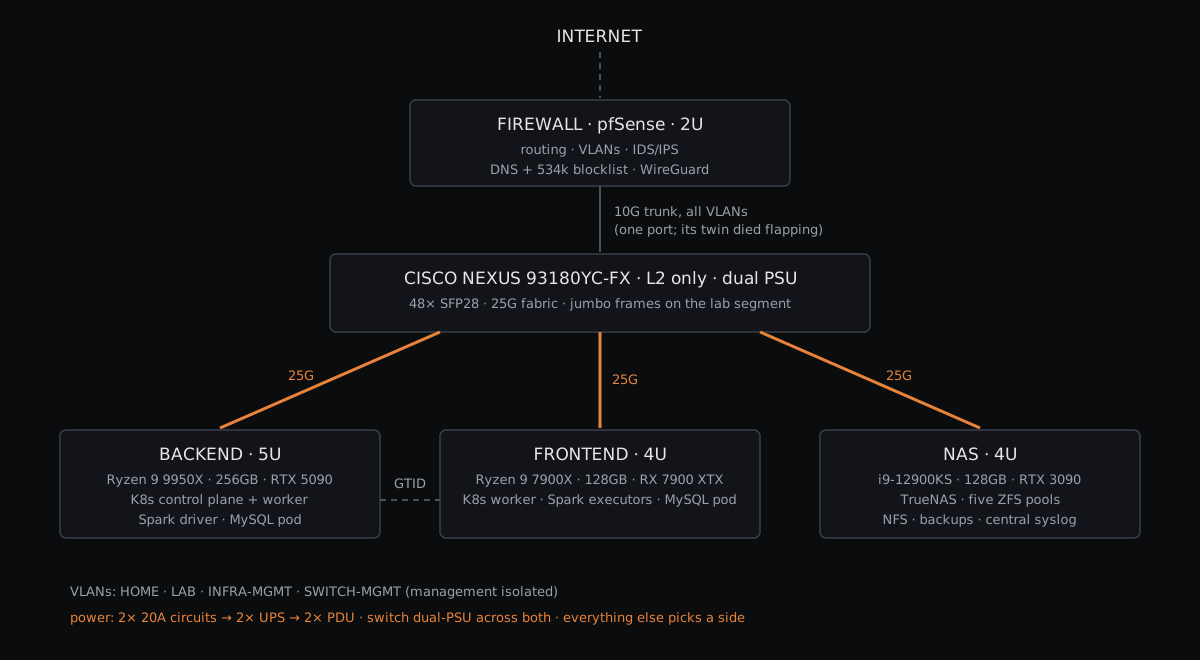
The core is a Cisco Nexus 93180YC-FX, 48 SFP28 ports at 25G plus 100G uplinks, running NX-OS, deployed purely as a layer 2 switch. Routing between segments is the firewall’s job. The switch moves packets at line rate and stays out of the way. It’s more switch than a basement needs. I wanted to learn NX-OS on real hardware. I was told Cisco was the way to go, so I went.
The three lab hosts connect at 25GbE over SFP28 optics and OM4 fiber, with jumbo frames end to end on the lab segment. The firewall hangs off a 10G trunk carrying the VLANs. Funnily enough, I chose 10G for stability, but one of the two 10G ports on its NIC failed early with a link-flap condition, so the trunk lives permanently on the survivor.
Traffic is split into VLANs for the trusted home network, the lab, infrastructure management, and switch management. The management segments are isolated from everything else. Remote access is WireGuard. Nothing else is exposed to the internet.
The stuff Kevin used to talk about has names for me now. Trunks, VLANs, link negotiation, the difference between a switch problem and a routing problem. Two years of nodding along, and the vocabulary finally maps to things I’ve configured, broken, and fixed on my own hardware. I’d like to think Kevin would be proud.
The 25G fabric gets used. NFS-backed Kubernetes volumes and Spark shuffle traffic both cross it, and the NFS mounts run multiple parallel TCP connections per host to fill the pipe.
Storage
Five ZFS pools on the NAS, split by role instead of one big pool:
- a mirrored SSD boot pool
- a bulk HDD mirror for backups, replicas, and anything that values capacity over speed
- a small SSD mirror just for infrastructure config, the files I can’t rebuild from memory
- an NVMe mirror for hot data, including the MySQL data the cluster mounts
- NVMe scratch for staging and transient work that nothing needs to survive
Everything hot gets scheduled snapshots, hourly on the busiest datasets and daily elsewhere, and replicates on-box to the bulk pool. Irreplaceable data also gets a long-retention window, weeks of history instead of days. The dream is to have my HDDs backed up to the cloud, but it’s tough going back to a vendor after building my own cloud.
I’ve had plenty of opportunities to practice losing data too. For example, there was a time when both members of the hot NVMe mirror hit the same firmware bug within hours of each other, and the pool went from DEGRADED to SUSPENDED overnight. Another time, an audit found a replication task that had been running green every night while copying an empty parent dataset, for months.
The Kubernetes cluster
Two bare-metal nodes built with kubeadm, Calico with VXLAN for the CNI. No managed control plane, no cloud load balancers, no CSI driver maintained by someone else. On top of it I run Spark via the Spark Operator, Airflow for orchestration, a MySQL StatefulSet with GTID-based primary/secondary replication, an Apache Iceberg lakehouse on MinIO behind a Polaris REST catalog, and all the buzzwords a LinkedIn post needs.
That stack runs the StockAlgo pipeline, 11 technical indicators across 13,000+ symbols, every hour. If you read the post about building that pipeline by hand in MySQL, this cluster is where version 2 lives.
The reason for self-hosting all of it is that Spark, Iceberg, Polaris, and MinIO sit exactly where Glue, Athena, and S3 would sit in a managed setup. Wiring them together myself made every integration seam explicit. When the catalog and the object store disagree, I’m the one who has to fix it, so I have to understand the handshake. I got to learn by doing, and sometimes crying.
Security
Deny-by-default firewall rules on every interface, with the broad pass rules removed. Suricata running inline as IPS on the WAN. DNS-level blocklisting at roughly 534,000 entries. An internal certificate authority on ECDSA P-384 issues real HTTPS certificates for every internal service, so nothing on this network talks plaintext and my devices trust the CA properly instead of clicking through warnings.
The setup mirrors what I think a small company’s network should look like, and running it surfaces the same problems those teams deal with. The IDS has blocked my own legitimate traffic more than once. Certificate lifecycles need actual management. Every lockdown decision costs usability somewhere.
Observability
Prometheus scrapes node_exporter on all four hosts plus SNMP from the firewall, Grafana sits on top, and every host forwards syslog to a centralized receiver on the NAS, where the archive lands on ZFS and rotates daily.
That archive has settled more than one argument. Months into a recurring DNS failure, it let me check my earlier theories against what had actually happened, timestamp by timestamp. Some of those theories didn’t survive. I hate to admit it, but documentation comes in handy when you’re managing a system.
When the power actually goes out
Power loss triggers UPS-driven staged shutdowns in dependency order. Compute nodes shut down first on a battery timer, storage after, and the firewall holds out until low-battery. The order matters because the shutdown path itself crosses the network. A storage box that powers off before the hosts still writing to it turns a power blip into a recovery project.
The runtime math isn’t static either. GPU load on the backend meaningfully shortens how long its UPS lasts. That’s the kind of thing you only find out by measuring, and it’s worth re-measuring before anything power-hungry gets added.
Posts about this lab
- I Built Airflow, Spark, and Iceberg by Hand in MySQL: the pipeline that runs on this cluster
- MySQL on Kubernetes: StatefulSet and GTID Replication: the replicated database living on these two nodes
- My Backups Ran Green Every Night and Backed Up Nothing: the audit of this NAS’s snapshot and replication tasks
- Three Bugs Wearing One Trench Coat: the resolver saga on the firewall
- When Both Mirror Drives Fail the Same Way: the night the hot NVMe mirror lost both members
- Detection Is Easy, Recovery Is Hard: the firewall’s watchdog ladder
More deep dives are coming. This list grows as they land.