Detection Is Easy, Recovery Is Hard
One night in August my firewall’s watchdog successfully fired. It watched the WAN die at 9:41 PM, ran 5 minutes of dead probes, confirmed the physical link was up, logged REBOOTING (burst 1/5), and rebooted the box. The reboot hung and the box was frozen for ten minutes until I physically bounced the server. Once it was back up the watchdog’s log showed a successful reboot, because the reboot counter was increased right before attempting to reboot and the counter was stored on disk. After the physical reboot the probe logged RECOVERED even though its reboot failed. Literally, two nights later, my fix for the freeze made the kernel panic, but we have to get through the boring stuff first.
Detecting your WAN being down is easy, mostly because your entire house losing internet is a loud enough alarm. Recovery is where things go wrong. The goal is to design a system that cannot fail, which turns out to be pretty darn difficult, and it’s why the industry heavily supports having servers run in multiple locations ready to become the main server, or as the experts call it, redundancy. I’m lucky enough to say my firewall’s recovery mechanisms failed six ways between production and testing. The DNS saga covered a recovery script I wrote that added a race condition to my firewall’s boot process. This post is about my continuous failures trying to reboot my firewall via automation.
Why the recovery is a reboot at all
The failure being recovered from lives outside the box. My ISP line transmits upstream at 54 to 57 dBmV against a spec of 35 to 50, pinned at maximum power with zero headroom, and on wet days it isn’t uncommon for the gateway to drop. Sometimes the gateway reboots itself and everyone’s happy, and sometimes it wedges, management CPU up, uptime ticking, status page still answering, but the data path gone. The wedge always looks the same, link up, no DHCP or route events, and modem uptime showing it never rebooted, which rules out cable, power, and a crash. Physically rebooting the firewall always fixed it.
If this post wasn’t nerdy enough already, here’s my technical explanation why rebooting the firewall fixes a wedge that lives in the modem. A firewall reboot forces fresh link negotiation and a fresh DHCP conversation, the only lever that reaches outside my firewall. It makes a wedged gateway rebuild its dead forwarding entry, and after a gateway reboot it hands a lease request to a gateway that’s ready to answer. The gateway coming back on its own did not reliably bring my WAN back with it.
The most annoying part was that before the watchdog, the reboot was me. The firewall lives in a basement rack, the gateway drops a couple of times a day when it rains, and every drop meant a walk downstairs to reboot the firewall by hand. And I’m lazy! The rest of the post is the different steps taken to avoid walking up/down those stairs.
Rebooting worked, everything else I tried didn’t. The gentler recoveries, bouncing the interface, reloading it through pfSense’s control socket, both failed when I tried them. They left WAN, DHCP6, and the resolver in half broken states. A reboot serializes recovery, everything comes up in dependency order exactly once. The script follows the best advice I’ve ever received, keep it simple, stupid.
Layer one, the detector
pfSense’s built in gateway monitor still observes and graphs, but its actions are disabled. The built in monitor’s actions are tied to the interface bounces that proved harmful. I used ole reliable, a shell script run by cron every minute, for detecting a gateway wedge.
The script checks two independent anchors, 1.1.1.1 and 8.8.8.8, which have to be dead for five consecutive minutes, so a flaky anchor or a single provider’s routing blip can’t trigger a reboot. Then one guard. The physical link has to be up, because a down link means an unplugged cable or a powered off modem, which a firewall reboot cannot fix. That guard is also what makes the gateway’s self reboots safe to automate. The link goes dark while the gateway boots, the watchdog holds its reboot through the outage, and starts counting again once the link returns. The guard proved it worked the day the modem spontaneously rebooted itself, the watchdog logged no action (cable/modem power) and correctly skipped the reboot.
Layer two, learning when to give up and when not to
Version one had a poorly thought through safety mechanism. One reboot was allowed every six hours. As you may have expected, the rate limit caused its own outage. During a gateway provisioning incident, watchdog correctly detected the dead WAN and rebooted at 11:00, while the gateway was mid boot. Correct behavior, wasted the only available reboot for the next six hours. The gateway finished booting minutes later, and the retry that would have worked was now six hours away. I had to walk up/down those damn stairs again to reboot the server.
My initial rate limiter decided the script was only allowed to reboot once per six hours and accept whatever state my firewall ended up in. What an awful design.
The replacement is a burst policy:
| Old policy | New policy |
|---|---|
| 1 reboot per 6 hours, flat | 5 dead minutes triggers a reboot |
| No retry inside the window | Up to 5 reboots, 15 minutes apart |
| No memory of the incident | Persistent counter, cleared on recovery |
| Gave up for 6h after one attempt | 3 hour STAND-DOWN after a full burst, then a fresh burst |
Fifteen minute spacing gives the gateway time to breathe before the next attempt, five attempts covers a slow recovery, and the stand-down still prevents an infinite loop. The counter survives reboots on disk. During a real grid outage the burst spends all reboots into a dead line and stands down, which is harmless.
A cool afterthought is that this script already exists. Notice the internet is gone, force a fresh lease, repeat until it works, that loop is what the firmware in any consumer all in one runs forever, which is why nobody with a rented gateway ever encounters this problem. Running your own firewall means dealing with all the fun problems huge corporations have already solved. A mesh box’s retry is nearly free and will continually try to refresh an expired lease until successful or turned off. My box is a full firewall reboot with Suricata and the resolver coming up behind it, so bursts with stand-downs were my solution.
Layer three, the night the reboot itself hung
Which brings us back to the opening. The freeze was detected perfectly, and the recovery command, a standard orderly shutdown -r, froze inside rc.shutdown while tearing down services, which wasn’t a new freeze. The watchdog attempted to reboot and the command to reboot hung. The on disk counter counted the eventual manual recovery as an automated one. Here’s that whole day, from the log:
2026-08-02 11:00:06 WAN dead 5m (link up) - REBOOTING
2026-08-02 11:25:06 WAN dead 5m - reboot rate-limited, standing by
2026-08-02 11:26:03 RECOVERED after 300s without action
2026-08-02 14:12:06 WAN dead 5m but link DOWN - no action (cable/modem power)
2026-08-02 14:23:00 RECOVERED after 900s without action
2026-08-02 14:39:06 WAN dead 5m - reboot rate-limited, standing by
2026-08-02 14:42:03 RECOVERED after 420s without action
2026-08-02 21:46:06 WAN dead 5m (link up) - REBOOTING (burst 1/5)
2026-08-02 21:57:00 RECOVERED after 0s (reboots this incident: 1)
The last two lines are the lie. Eleven minutes sit between REBOOTING and RECOVERED after 0s, and most of them were the box hanging in rc.shutdown while I was walking down stairs to reboot the box, but the log reads as a clean automated save. I checked the same logs when the link DOWN guard skipped rebooting at 14:12 while the modem power cycled, and the old rate limit stood by twice while the line recovered on its own.
The fix was to replace shutdown -r with /sbin/reboot -q, which skipped rc.shutdown. No service teardown means nothing should hang, the disks get synced, and ZFS is crash consistent anyway, so worst case is the same outcome as me cutting power. shutdown -r is the polite path, and I needed one that couldn’t get stuck. The box is already broken and the goal was to have a reboot complete.
Layer four, the one that panics the kernel
Within those two days, another, deeper fix was made. reboot -q still required a functioning terminal for the script to run, and if the system ever stalled harder than that, I’d get my steps in to reboot the server. The answer lives in FreeBSD’s kernel watchdog, driven by watchdogd -t 128 -s 10 -x 300. The daemon sends a heartbeat to the kernel every ten seconds. If 128 seconds pass without a heartbeat, the kernel panics, and panic reboots the box. The -x 300 arms a dead man’s switch, a final 300 second timer, so if the daemon exits during a shutdown and the shutdown never completes, the box gets forcibly rebooted anyway.
The hardware version is the only true guaranteed solution, a real watchdog timer chip that fires even through a kernel wedge. amdsbwd.ko, the AMD chipset watchdog driver, isn’t shipped in the pfSense version I’m running. kldload just reports no such file. wbwd.ko, the Super I/O driver, loads happily and fails to attach to my motherboard’s chip. pfSense ships with ichwd, Intel’s watchdog driver, and it isn’t compatible with an AMD chipset. /dev/fido is the watchdog framework’s device node, present no matter if any real hardware backs it. These were tested by playing in the terminal and running watchdog -t, arm a timeout and clear it, and then reading hw.watchdog.wd_last_u to see if the heartbeats land. That’s how I knew the software layer was live while the hardware layers weren’t.
The night my kernel exploded
Two evenings later, around 6:30 PM, the line dropped for at least the fifth time in four days. The watchdog detected it, fired burst 1/5, and executed reboot -q. And if trying to forcibly reboot your own firewall server wasn’t scary enough, -q turned out to be the next piece that needed my attention. The -q that skips service teardown also skips orderly process termination, so the kernel began dismantling itself while processes were running. The message buffer preserved the result, a wall of simultaneous signal 11 crashes, unbound, syslogd three times over, cron, four minicron jobs, node_exporter, a shell, a daemon, a sleep, all segfaulting in the same instant, and dhclient itself, the process whose DHCP conversation is the entire recovery mechanism, dying mid recovery. Then the kernel itself took a page fault and panicked. This holds the record for number of errors thrown from a single script I’ve written, and also the record for scariest error, thanks to the kernel panicking. I built a race condition in my watchdog script. Who would’ve guessed adding a dead man’s switch to a shutdown process would cause issues?
On the positive side, the software watchdog fired exactly on schedule. KDB: enter: watchdog timeout meant layer four detected the stall.
Its recovery failed, even closer to the hardware level. pfSense ships with debug.debugger_on_panic=1, so instead of dumping and rebooting, the panic put the machine into a kernel debugger prompt. To be fair, the debugger tried to reboot. Its automated script ran the full sequence, capture off, textdump dump, Textdump complete., and then reset, the command responsible for rebooting out of the debugger. The backtrace it printed shows what happened next. reset invoked kern_reboot, the kernel’s reboot path walked into ZFS module teardown, zfs_shutdown into zfs_kmod_fini into destroy_dev, and teardown, of course, took a page fault of its own, panicking the machine inside the panic handler. New scariest error by the way. The screen ends with KDB: reentering, a second backtrace, Script command 'reset' returned error, and a bare db> with the cursor blinking. When I finally walked down stairs, the monitor I’d plugged in showed:
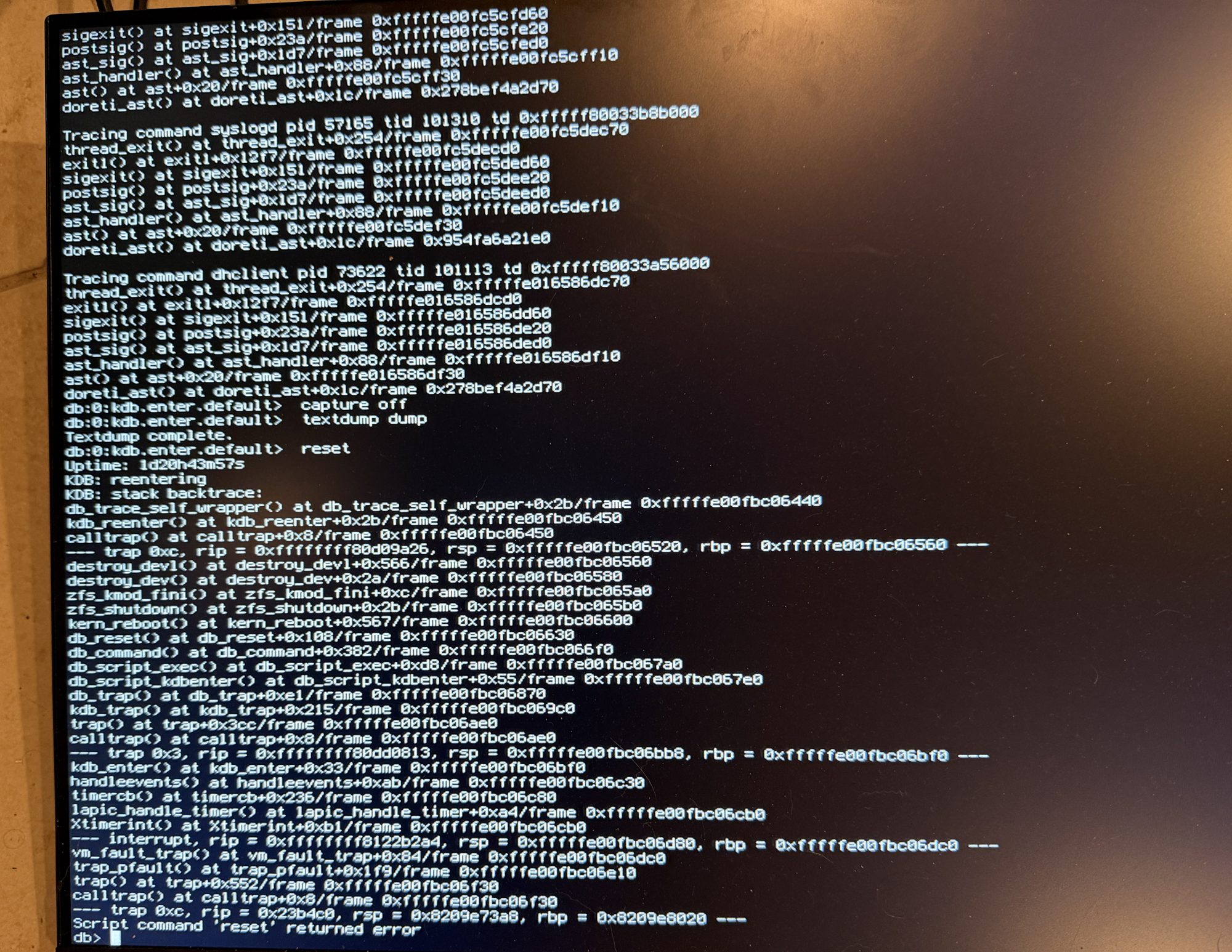
The whole failure in one picture. The top shows the processes dying as reboot -q shut down everything around them. The middle shows the debugger capturing its own crash dump, with the box’s uptime, 1d20h43m57s, which is when the trouble started. The bottom shows the reset attempt panicking inside ZFS teardown and falling back into the debugger it unsuccessfully tried to leave.
The box wedged at that prompt until the second manual reboot around 7:00 PM, and the boot logged RECOVERED with the counter reading 1, which was the second time in three days the log filed a manual reboot under automated success. I’d checked the script, the retry policy, the reboot command, and the watchdog daemon. I didn’t think or know to check what pfSense does while it’s panicking.
I can’t believe I’m saying this, but I kept going. The first change was the tunables, debug.debugger_on_panic=0 and kern.panic_reboot_wait_time=10, so a panic now writes its crash dump and resets in ten seconds with no debugger in the loop, which got rid of the wedge at db> problem. The second change was the reboot call, changed from reboot -q to plain /sbin/reboot, which still skips rc.shutdown, the original proven hang site, but performs proper process termination and unmounts first, so there’s no teardown race.
The problem child, intentional shutdowns
A watchdog aggressive enough to reboot through any stall has one obvious blind spot. It can’t tell a stall from an intentional halt. Power the box off deliberately with the final timer armed, and about five minutes later it boots itself back up, recovering from the outage. The runbook rule is watchdog -d before any deliberate poweroff. The UPS integration’s low battery shutdown script must disarm the watchdog before powering off, or a dying UPS will shut the firewall down cleanly and the watchdog will boot it right back into the dying UPS.
The fix that I’ve been avoiding from the get go
A hard kernel freeze is the last unaccounted failure. It hasn’t happened on this box, and the solution was my initial failure recovery method, which has been continuously pushed back. A Raspberry Pi on separate power driving the motherboard’s reset header through an optocoupler, triggered only when the firewall is unresponsive to direct probes for five minutes, rate limited like everything else.
An honest note before the chart. When this ladder was first drawn, plain /sbin/reboot was the newest rung and had never fired in a real incident. Its turn came, and what it did, what the crash dump revealed, and how the last rung ended up built in silicon instead of a Pi deserves a post of its own.
The ladder
| Failure class | Detected by | Recovered by | What it taught |
|---|---|---|---|
| Gateway forwarding wedge | 5 min dual anchor probe | Firewall reboot (forces gateway to rebuild state) | Gentle bounces fail and a reboot starts fresh |
| Reboot into a still dead line | Persistent incident counter | Burst retry, 5x at 15 min spacing | Retry spacing and give up limit need separate settings |
| Orderly shutdown hangs | Timestamps, not the log | Skip the teardown | A recovery reboot needs to finish |
| Skipping teardown races the kernel | Crash dump, signal 11 wall | Plain reboot, terminate processes first | -q skips more than the hang |
| Userland dead entirely | Kernel watchdog, 128s | Kernel panic | Fired on schedule its first real time; check if the reboot completed |
| Panic parks in a debugger | A photographed db> prompt | debugger_on_panic=0, auto reset in 10s | pfSense has debugger-on-panic enabled by default |
| Hard kernel freeze | External Pi probe (planned) | Reset header via GPIO | The reset path can’t be the frozen kernel |
Every row on the ladder exists because the row above it failed. Six failures, the log filed two manual reboots as automated saves, the fix for the hang caused a kernel panic, and then the panic handler panicked, while I was also panicked. The system still isn’t bulletproof, the line that causes all of this still drops when it rains. My obviously unbiased opinion is lazy devs are the best devs. I haven’t had to do the walk of shame to my basement in weeks.