When Both Mirror Drives Fail the Same Way
On the last night of July, the scheduled scrub on my hot storage mirror killed one of the two NVMe drives. The next morning, I killed the other one.
A mirror is supposed to make a drive failure boring. One member dies, the pool degrades, you swap the drive, done. That only works if the two drives fail independently. I made sure both of mine failed together. Same model, bought in the same order, same firmware, same data, same workload.
This is the pool that holds my MySQL data and application state, on the NAS.
What happened
| When | Event | Pool state |
|---|---|---|
| Evening | Scheduled scrub; drive 1 hangs mid-scrub. Controller reset fails, the kernel disables the device, lsblk shows it as 0B | DEGRADED |
| ~Midnight | PCIe remove/rescan can’t revive it. I power the NAS off for the night | DEGRADED, powered off |
| Morning | Boot the NAS and run a scrub on purpose, to test whether the overnight power-off fixed drive 1 | DEGRADED |
| Minutes in | Drive 2 hangs under the scrub. Pool suspends, 641 I/O errors logged | SUSPENDED |
| After | Full cold power cycle, power button held 10s, cord out of the UPS for 30s, recovers both drives | ONLINE |
| Minutes later | Resilver completes in 18 seconds; validation scrub repairs 132K, zero errors | ONLINE, clean |
Here’s the UI that night:
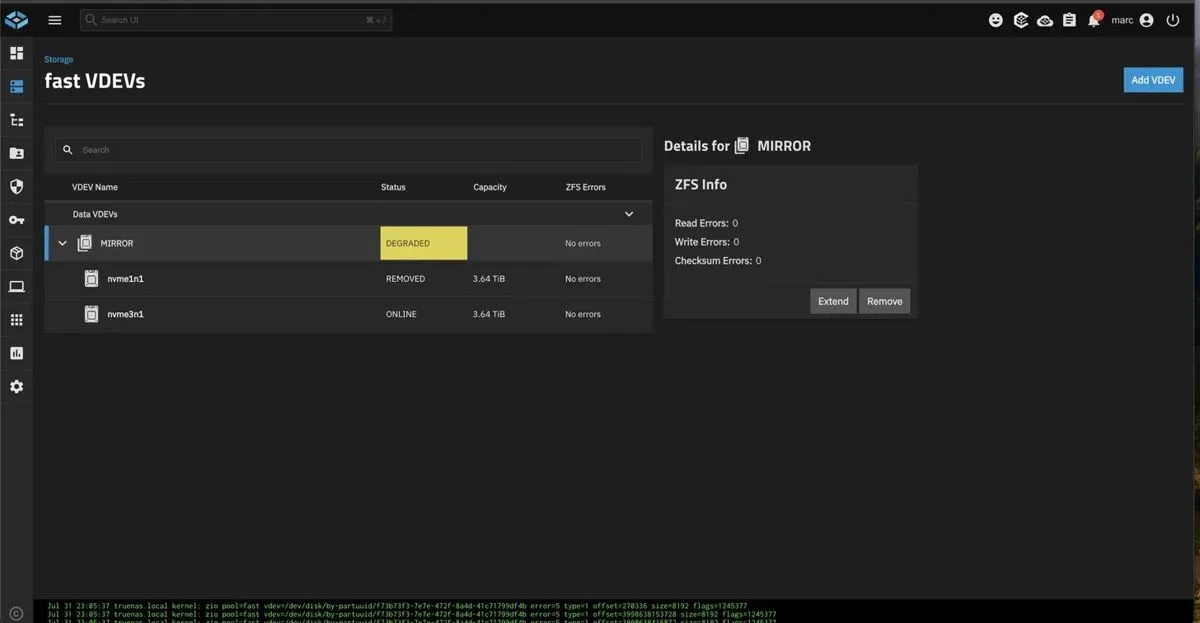
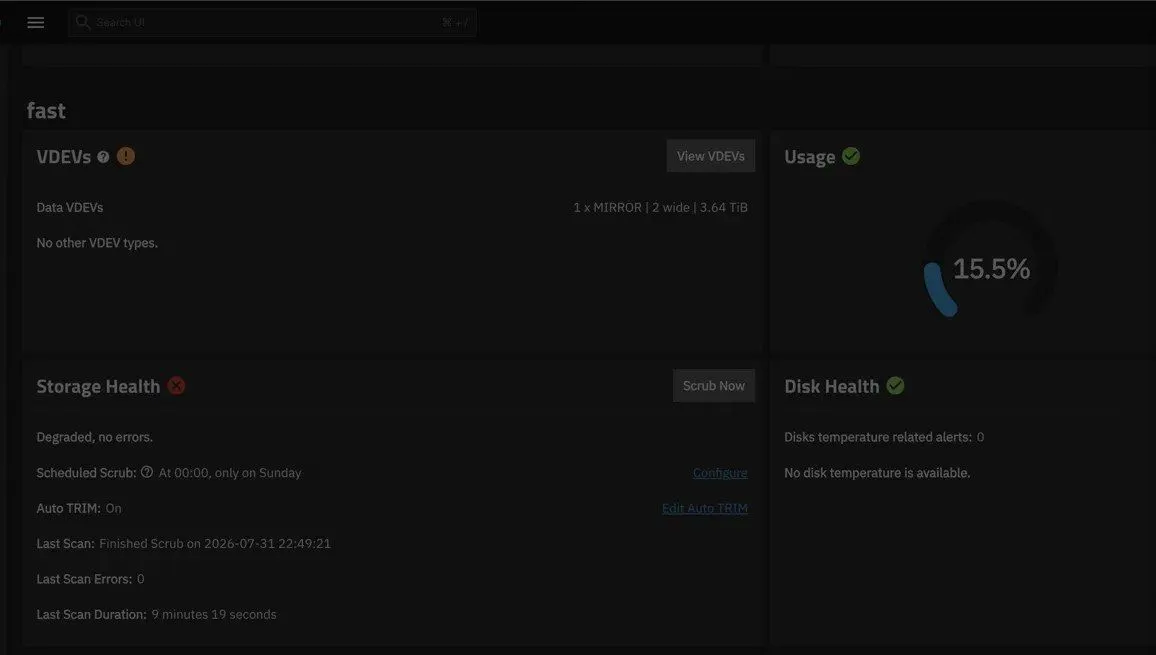
Two things worth pointing out. In the first image the status says “Degraded, no errors,” because the drive didn’t fail with errors, it just disappeared, along with any potential errors. Also in the first image, at the bottom of the screen, the kernel is throwing zio errors at a drive that’s gone, while the UI reports a clean scrub on the survivor.
Zero bytes lost. Two of the failures were me screwing up.
Mistake one: I scrubbed the survivor
When I scrubbed the pool in the morning, all I knew was that drive 1 had died during a scrub and I didn’t know why. The actual cause was a known firmware bug that locks the controller under sustained reads, which I figured out later. A scrub is about the most read heavy thing you can do to a pool. It reads every allocated block and checks it against checksums. So without knowing the cause, I took the exact operation the failure happened under and pointed it at the only copy of my data I had left.
It felt completely reasonable in the moment. The scrub is the health check. Something’s wrong, so you run the health check. I didn’t think the health check caused the drive to fail until drive 2 hung a few minutes later and the pool went SUSPENDED with 641 I/O errors piling up. A suspended pool means every read and write is frozen, and this pool holds the MySQL data, so for a few minutes I was fairly sure I had just destroyed it myself. I was also making a compelling argument why keeping my data in the cloud was better.
I’ve decided that next time a drive dies, the first move is backing up the live drive before trying anything else. The last copy’s only job is getting copied somewhere else, not double checking if it’s healthy by giving it a stress test.
Mistake two: the fix I was testing had never been applied
I caught the degraded drive late at night and didn’t want to physically unplug my NAS. I decided to turn off the NAS via ssh and sudo shutdown -p now. The goal was to cut power to the drive’s controller. That’s not what happened.
This bug wedges the drive’s controller, and a wedged controller doesn’t care about OS reboots or a soft power-off. It resets when the power is actually gone. What I tried only dropped the system to ATX standby, which keeps a small amount of power on the board, and my NAS is plugged into a UPS, and a UPS has one job, making sure the power never goes away. I’m happy to report it did that job perfectly all night. The standby rail stayed up, the controllers stayed wedged, and my big overnight experiment tested a power off that never happened.
The solution was to turn off my NAS, unplug it from my UPS, hold the power button ten seconds, and let it sit powered down for about 30 seconds. Once I plugged my NAS back in and turned it on, both drives came straight back, the pool imported, and the resilver took 18 seconds, because ZFS only resilvers what changed while the mirror was split. The validation scrub repaired 132K and found zero errors.
Same cause, twice
The only time you lose a pool using RAID1 is if the second drive dies before you’ve finished replacing the first dead drive. I had two identical drives from the same order which meant they didn’t just share a failure rate, they shared the failure itself, same bug, same trigger workload, same data, so when the trigger showed up, it applied to both of them. I was lucky the second drive didn’t die during the scrub that killed the first drive. I sentenced it to death when I ran the second scrub.
Any fleet of identical things, drives, servers, container images, is easy to run and fails together, and you don’t see the correlation until the shared trigger arrives. RAID protects against the failure you modeled, one drive alone, dying of hardware. A bug both drives carry isn’t in the model.
The scrub keeps finding my hardware
This is the second time a scheduled scrub created problems with my NAS’s hardware. The first was the only RAM error my NAS has ever thrown, and it was when its non-ECC memory ran overclocked at 6000 MHz. The memory controller held fine under normal load and couldn’t hold during a scheduled scrub. That’s why the RAM runs below its rating, and this incident is why the drives run their most up to date firmware.
I’ve stopped calling that bad luck. A scrub reads everything the pool holds, as fast as the hardware allows, while hashing all of it. Nothing my actual pipelines do comes close. So of course it keeps finding the weakest part. The scrub finds the weak component on a schedule, while I’m around, instead of real load finding it during something that matters. I started staggering my scrubs across pools on different days, so the discovery can’t happen everywhere at once. It serves as a monthly stress test for my NAS.
The fix, and what it doesn’t fix
I thought my drives were on the most up to date firmware. It turned out both nodes of my k8s cluster had their drives’ firmware updated, but my NAS did not. The incident is how I found out.
The immediate fix was flashing every drive of that model in the rack, five across three machines, to the fixed firmware. The release notes say it improves read-operation stability, which is a very calm way to put it. The update was a lovely Sunday spent in a basement. The vendor’s bootable updater needs legacy CSM turned on, and CSM breaks modern GPU features, so each machine got CSM on, flash, CSM off, one at a time.
I now have a yearly firmware and BIOS holiday on the last Sunday in July to check and update any firmware and BIOS across every machine in the rack. The boring tasks of a homelab are just as important as building on it and using it as a playground, if not more.
All five drives now run the same fixed firmware, so I cured the bug and kept the monoculture. One shared future bug and this whole post happens again. The real fix is mixing drive models or firmware revisions inside a mirror, which trades operational simplicity for failure independence, and I don’t want to pay that tax yet. What I did change is the blast radius. Scrubs staggered, and the MySQL primary and replica now sit on two different pools on different media. That decision is from this exact night.
The day after
While the pool was suspended, the only thing between me and real data loss was the layer underneath it, snapshots, plus the replicas on my bulk HDD pool. I didn’t end up needing them. I audited them the next day anyway, and that audit found a replication task that had been backing up nothing for months.
Zero bytes lost, and I only get to say that because the drive’s version of turn it off and on again fixed my issue.