Crossing Fields: Kubernetes Internals
My first Kubernetes bug took 13 hours and ended in a one line fix. That ratio never improved, the lines got more interesting.
In spring 2026 I built a two node Kubernetes cluster on bare metal with kubeadm. Calico for networking, containerd for the runtime, and Helm for installs. It runs the second version of my stock analysis repo, a MySQL StatefulSet with GTID replication, Airflow, the Spark Operator, MinIO, and Polaris. If the links in the last sentence didn’t make it obvious, I’ve written about this project quite a few times already, each post covering a different component. Continuing down the rabbit hole, here’s a deep dive into the Kubernetes component.
Kubernetes was by far the most difficult component from this project. In database multi-threading, the services/resources are allocated automatically. Working with Kubernetes, nothing’s automatic, from how many pods a manifest can spawn, the resources a pod can acquire, DNS configuration, all the way to when and why a pod is killed. I understand every piece of that sentence, and by the end of the blog, you will too. Kubernetes asked me for everything I had taken for granted inside databases.
Let’s start off with some general definitions, in depth definitions will come later. A container is a single process and a pod is a group of containers with optional attachments, like mounting a directory, specifying cpu/ram per pod, or attaching an IP. I like to think about it like a pod is the completed lego set, while a container is a lego in the set. The instructions for the lego set are called a manifest. It specifies what piece and how much of that piece attaches to the pod. A node is either a server or a VM that pods run on. A cluster is multiple nodes that pool their resources and answer to one control plane. To control all of this we separate it between two different sets, a control plane and a data plane. A control plane does exactly what it sounds like, it controls the cluster and makes decisions about it. A data plane, unsurprisingly, focuses on the data inside the cluster and is responsible for executing workloads and moving traffic between nodes.
The tools
Almost everything in this article builds off the control plane, but first, the four tools that manage a cluster:
| Tool | Job |
|---|---|
| kubeadm | Responsible for cert creation and renewal, control plane creation, and adding nodes to a cluster. |
| kubelet | Runs on every node, starts and stops containers to match the pod specs assigned to its node, and restarts crashed containers on its own authority. |
| kubectl | The command line tool used to talk to the cluster. kubectl apply sends YAML in, kubectl get and kubectl describe read objects back, kubectl logs and kubectl exec reach inside running pods. It reads a kubeconfig file holding the cluster’s address and my certs. If you memorize the above commands you can debug the majority of k8 issues. |
| helm | The package manager for k8, the npm or pip of the cluster. helm install is k8’s version of pip install. Airflow, the Spark Operator, MinIO, and Polaris all were created using helm install. |
The kubelet decides if a container should exist, then hands the decision to containerd, the container runtime on every node. containerd pulls the image from Docker Hub, unpacks it, and runs it as a plain Linux process a.k.a. a container. Each node’s containerd pulls an image from Docker Hub once, the slow first pull, then every container on that node reuses the cached layers with its own thin writable layer on top. The cache is per node, not per cluster.
Inside the control plane
Similar to Apache Polaris and Iceberg, Kubernetes uses a transactional database to protect its critical section. The database is responsible for keeping track of any object Kubernetes controls. The control plane’s made up of four pieces:
| Component | What it actually is |
|---|---|
| etcd | The database. It contains everything kubectl apply creates along with the status of each object. |
| kube-apiserver | The frontend. It’s what responds to kubectl. It’s the only service that writes to etcd. |
| kube-scheduler | Picks the node a new pod runs on. A pod never switches nodes, scheduling happens immediately after the pod has been created. |
| kube-controller-manager | The loop that checks if pods need to be destroyed or created. It is only responsible for marking a pod for death or notifying that a pod needs to be created. It is not responsible for the action, only the flag. |
kube-apiserver is the only piece that writes to etcd, and every other piece calls the apiserver when it needs something recorded. The scheduler picks a node, then asks the apiserver to write the decision. The kubelet kills a pod, then reports the death to the apiserver, and the apiserver writes it.
kubeadm installs the control plane’s four pieces by running kubeadm init, which writes four manifests into /etc/kubernetes/manifests/, which hold the instructions for the control plane that typically lives on one node per cluster. kubelet watches the control plane’s folder and runs whatever sits in it via containerd. The pods that makeup the control plane are created by kubelet reading directly from those manifests. Any pod created by kubelet reading a manifest is called a static pod. A static pod skips any step involving the kube-scheduler and kube-apiserver. Static pods exist because the control plane’s four pieces are all pods, and we need a way to create them without using them. Every static pod gets a read-only mirror pod named manifest name-node name, which is how the kube-apiserver and kubectl know the pod exists. Do I stoop low enough to make the classic which came first, the chicken or the egg joke? I’ll let you decide, it would be a knee slapper.
It’s worth noting the control plane should sit on its own node, a rule I don’t follow because I have two nodes.

Workload contracts
A Kubernetes container is a Linux process that’s told what the process can see, namespaces, and what the process can use, cgroups, on the host’s shared kernel. That last part is the main difference between a container and a VM, and it’s also why a container can be created/killed so quickly. A pod is a wrapper for containers. A pod can have an infinite number of containers, but it has a single IP, a single shared network space, and is what Kubernetes schedules. There are several different instructions we can tell the kube-controller-manager to follow per manifest. These are called controllers, and each one tells the kube-controller-manager to follow a different set of rules:
| Controller | Definition |
|---|---|
| Bare pod | A boring pod with no controller. It runs until the script ends, then follows its restartPolicy of Never, Always, or OnFailure. Nothing recreates it if the node dies. |
| Deployment | A controller used when you don’t care where the pods run or which pod is which. Pods live forever with random names. If I kill a pod, a new one appears somewhere. |
| StatefulSet | A controller used when you care about distinguishing one pod from another. Pods live forever with static names. mysql-0 dies, mysql-0 comes back. |
| DaemonSet | A controller used when you want exactly one pod on every node. Calico’s node agent and kube-proxy (Networking, we’ll get to this) run as DaemonSets. |
| Job | A controller used when you want something to run until it succeeds x times or fails x times. It lives until exit 0, retries failures per backoffLimit, and successful runs count toward completions. |
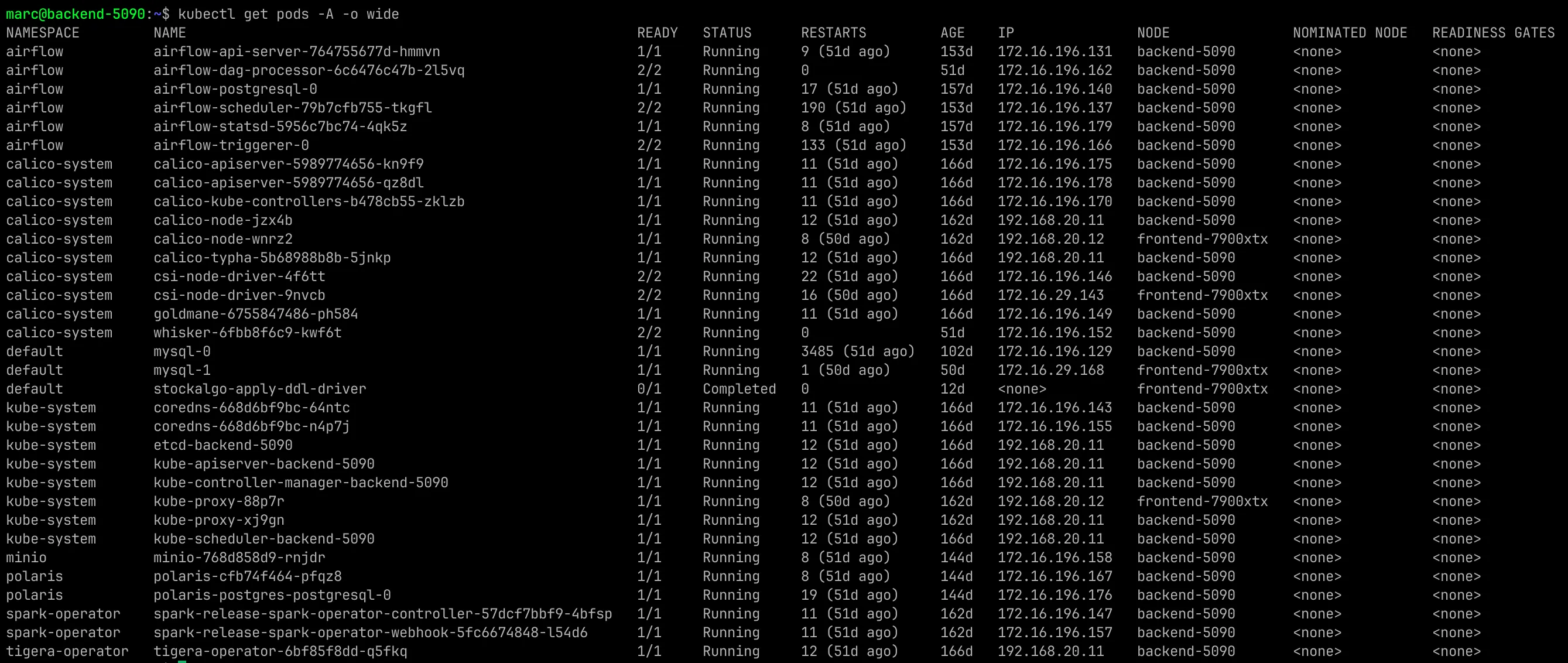
An example of a Job I run is my integration test suite, from the repo:
apiVersion: batch/v1
kind: Job
metadata:
  name: stockalgo-integration-tests
spec:
  backoffLimit: 0
  template:
    spec:
      restartPolicy: Never
      containers:
        - name: pytest
          image: marcpaulthecoder/stockalgo:latest
backoffLimit 0 because a failing test suite should fail loudly.
The Scary Part, Networking
Networking is never simple, and I’m happy to say it isn’t simple for Kubernetes either. Kubernetes networking has three pieces, the CNI, CoreDNS, and kube-proxy.
Kubernetes leaves an open slot for a plugin to handle networking, the plugin’s called the Container Network Interface, or the CNI. My CNI is Calico. Calico hands every pod an IP the moment it’s created, which is called a Pod IP. Calico is also responsible for communication between nodes in a cluster. Pod IPs sit on a network interface inside the pod, and the Pod IP dies with the pod. The replacement pod gets a different Pod IP from Calico.
Having to change the IP whenever a pod hosting a database dies doesn’t seem like a lot of fun, I’d go as far as calling it a nightmare if we add database replicas. Kubernetes solves this with a separate object that owns a static virtual IP and forwards to a group of pods picked by matching labels, this is called a service. A service finds its pods through its selector, which is the labels field in the service’s manifest, and any pod whose manifest carries a matching label belongs to that service. Kubernetes keeps the live Pod IPs of every pod belonging to the service in an object called Endpoints. When a pod dies and is replaced, the Service IP stays the same. A Service IP is a connection string that survives database failovers.
That leaves the cluster with two completely different kinds of IPs:
| IP type | Assigned by | Nature |
|---|---|---|
| Pod IPs | Calico | Real. On an actual network interface. Dynamic, when the pod dies the IP changes. |
| Service IPs | The apiserver | Virtual. Pulled from a reserved CIDR assigned per cluster. Static, they always map to the Pod IP. |
CoreDNS is the next piece, the cluster runs a DNS server to map pods and services. It turns a service’s name into the Service IP, and every pod is instructed during creation to use CoreDNS as its DNS server, which lets a pod reach any service by name.
kube-proxy is the last piece of the puzzle. kube-proxy writes the Endpoints list into iptables. iptables is a set of rules every node follows when routing traffic. The rules map every Service IP to its current Pod IPs, and every node carries the same rules. Coincidentally, I think the Service IP is the best way to describe imposter syndrome in tech, an IP that’s not really an IP determines where service traffic is sent. If an entry in the iptables is responsible for that, imagine what a clueless engineer could do, I’m nervous thinking about it.
Calico assigns the Pod IPs. CoreDNS turns names into Service IPs. kube-proxy turns Service IPs into Pod IPs. Calico carries the packet.
The three service types I’ve used
| Type | Reach | Use |
|---|---|---|
| ClusterIP | Internal Only | Makes a pod reachable inside the cluster. |
| NodePort | Internal and External | Assigns a port on the node which can be used to communicate with the pod associated with the Service. |
Headless (clusterIP: None) | The DNS is the pod’s unique name | Mainly used for databases, keeping track of primary/secondaries. |
Here’s the reader service for my replica, from the repo:
apiVersion: v1
kind: Service
metadata:
  name: mysql-np-reader-service
spec:
  type: NodePort
  selector:
    app: mysql
    statefulset.kubernetes.io/pod-name: mysql-1
  ports:
    - port: 31222
      targetPort: 3306
      nodePort: 32378
The three port fields:
| Field | Meaning |
|---|---|
| port | The port the Service IP listens on inside the cluster. |
| targetPort | The port the application listens on inside the container. |
| nodePort | The port opened on the node. External traffic enters here. |
Headless, or DNS instead of a lock table
A normal service spreads connections across every pod that belongs to it. Each new connection can land on a different pod. For database replication it’s a disaster, because my primary needs to write and the secondary needs to copy. A service that hands out whichever pod is available, doesn’t do the trick.
A headless service is a service with clusterIP: None in its manifest. That field removes the Service IP and the iptables rules completely. In its place, CoreDNS gives every pod in the service its own unique DNS name that resolves to that pod’s current Pod IP. On my cluster the name is mysql-0.mysql.default.svc.cluster.local, mysql-0 is the pod’s name, mysql is the service, the rest is a suffix that every name in the cluster shares. The pod dies, the replacement gets a new Pod IP, and the name follows it. My replica connects to the name and always lands on the primary.

How a StatefulSet registers its pods for those names, and the field I missed on my first attempt, is in the StatefulSet post.
Calico
Calico does four jobs on my cluster. It assigns every pod a Pod IP. It moves traffic between nodes so a pod on one node can reach a pod on the other. When using one subnet, Calico routes Pod IP traffic as ordinary traffic. Across different subnets it uses VXLAN, a tunnel that wraps pod traffic inside normal node to node traffic, so networks that have never heard of Pod IPs allow pod to pod communication. Calico enforces NetworkPolicy, which is firewall rules for pods. And it NATs traffic leaving the cluster, NAT meaning network address translation, rewriting the source so the outside network sees the node’s address instead of a Pod IP it wouldn’t know how to answer.
Calico was also responsible for my first real Kubernetes bug. calico-node sat in CrashLoopBackOff, the state where a pod dies, restarts, and dies again, for 13 hours after I installed it. The root cause was my own network design. The physical network card on my backend server, enp3s0f1np1, has no IP address on purpose. The address lives on a virtual bridge, br-lab, so a Windows VM can share the physical link. When Calico started, it had to pick which network device to use, and its default is to take the first device it sees, firstFound. It grabbed the NIC, found no address, and died in a loop for 13 lovely hours. The fix was a single edit. kubectl edit installation default, change nodeAddressAutodetectionV4 from firstFound: true to interface: br-lab. 13 hours for a single line really lowered morale moving forward.
PVC and PV
Kubernetes splits storage into two objects. A PVC, the PersistentVolumeClaim, is the pod asking for storage. A PV, the PersistentVolume, is storage that exists, with its location and size written down. The pod’s manifest states what it needs, a size and an access mode, which is how many writers the volume allows. The cluster admin writes PVs describing what exists. A loop in the control plane pairs each claim with a volume that satisfies it. The split exists so the ask can live with the app while the supply lives with the infrastructure.
My PVs all point at NFS shares on my NAS, network drives the nodes mount over my LAN, and every one is set to Retain:
apiVersion: v1
kind: PersistentVolume
metadata:
  name: fast-nfs-pv-sql0
spec:
  capacity:
    storage: 1Ti
  accessModes:
    - ReadWriteOnce
  persistentVolumeReclaimPolicy: Retain
  mountOptions:
    - nconnect=8
    - nfsvers=3
  nfs:
    server: "192.168.20.13"
    path: "/mnt/fast/mysql/data0"
There are four rules that matter:
1. Binding is greater than or equal, not equal. A 1Ti PV happily binds a 100Gi claim. A 4Gi PV will never bind an 8Gi claim, and the claim sits in Pending.
2. Access modes must be compatible on both sides. ReadWriteOnce means one node at a time may mount the volume for writing. My database PVs/PVCs are all ReadWriteOnce, because a volume with multiple writers is a step away from locking a database.
3. The reclaim policy fires when the PVC is deleted, not when the pod dies. Retain means the PVC can be deleted and the data isn’t. Delete means the data follows the claim. Everything I own is Retain, because I’d rather deal with running out of space than deleting something I need.
4. claimRef pins a PV to one named PVC before either exists. I use it on my Airflow volumes. Helm install creates its PVCs with no selectors, so pinning by name is the only way to guarantee Airflow’s own postgres claim lands on the postgres volume and not on whatever 8Gi PV happened to be free. The MySQL volumes bind the normal way, each pod’s claim comes from a template inside the StatefulSet. I should claimRef both PVs for my StatefulSet. I should also go to the gym more.

When I was a Kubernetes noob, I had two PVs pointing at the same NFS path. The best part was, it was the PVs of my StatefulSet, holding my database. It meant both MySQL instances writing in the same directory, sharing ibdata, conflicting lock files, guaranteeing corruption. That’s how I found out Kubernetes doesn’t have safeguards.
ConfigMap and Secret
A ConfigMap is settings stored in the cluster as key value pairs, pulled into pods as mounted files or environment variables. Env values freeze when the container starts; my configs mount as files. I used a ConfigMap named mysql holding both primary.cnf and replica.cnf. The full configs, and how each pod picks the right one, are in the StatefulSet post.
The my.cnf lives outside the image and outside the data directory on purpose. Messing up a database’s config is harder to recover from than messing up its data. The config gets its own object with its own history.
A Secret is the same thing with base64 encoded values. One echo dGVzdA== | base64 -d and you have the Secret’s content. Like any other cybersecurity policy, the protection comes from permissions, who is allowed to read the Secret object, and following the least rights idea. Files beat environment variables for secrets. Environment variables show up in crash dumps, debug logs, and every child process. A file mounted in the container doesn’t. My MinIO keys, Polaris credentials, and the MySQL root password all sit in secretKeyRef, which is the manifest field that pulls one value out of a Secret into the pod. It’s the first part I’d tighten if this cluster didn’t sit behind my overkill firewall.
RBAC
RBAC is MySQL permissions with different keywords. A Role is a set of rules. apiGroups is the family of APIs, resources is the exact API, and verbs are the rights. A RoleBinding attaches the Role to subjects. A subject is who gets the permission, a user or a service account. Together that’s GRANT SELECT, INSERT ON db.table TO ‘user’, written in YAML.
The real one from my cluster, trimmed:
kind: Role
metadata:
  name: airflow-spark-submit
rules:
  - apiGroups: ["sparkoperator.k8s.io"]
    resources: ["sparkapplications", "sparkapplications/status"]
    verbs: ["create", "get", "list", "watch", "delete", "patch", "update"]
---
kind: RoleBinding
subjects:
  - kind: ServiceAccount
    name: airflow-worker
    namespace: airflow
roleRef:
  kind: Role
  name: airflow-spark-submit
The grant lands on airflow-worker instead of Airflow’s scheduler because I run the CeleryExecutor, Airflow’s setup where tasks execute on separate worker pods instead of on the scheduler. The pod that actually runs my task is the pod that talks to the Kubernetes API, so it’s the pod that needs the permission. Tracing that one binding taught me more about Airflow’s architecture than the docs did.
kubectl auth can-i create sparkapplications --as=system:serviceaccount:airflow:airflow-worker is the command that makes RBAC debuggable. It’s SHOW GRANTS for the cluster. Yes or no, without deploying anything.
Time to Kill
Kubernetes kills pods on purpose, for upgrades, for rescheduling, for pressure. Death is cheap, the manifest will respawn anything killed that should be alive. Kubernetes even automates the decision with two probes. The first is a readiness probe which checks whether the container is ready for traffic. Fail it and the pod gets removed from its service’s Endpoints. The other probe is the liveness probe which checks whether the container is still alive. Fail it and the pod gets restarted. The easy way to understand the probes is, check if the pod is ready for traffic and make sure the pod has a heartbeat. If the pod has an issue with receiving traffic, don’t send traffic to it. If a pod doesn’t have a heartbeat, restart the pod.
kubectl delete pod mysql-1:
| Step | What happens |
|---|---|
| 1 | The apiserver marks the pod Terminating in etcd. |
| 2 | The endpoints controller sees Terminating and pulls the Pod’s IP out of the Endpoints object, kube-proxy rewrites iptables, and new connections stop arriving. All of this happens before the process is touched, which is connection draining. |
| 3 | The kubelet runs the preStop hook if one exists, a command the pod’s manifest asks to run before the kill signal. Then it sends SIGTERM, the polite kill. |
| 4 | The grace period runs, 30 seconds by default. |
| 5 | Anything still alive after the grace period gets SIGKILL. The forced kill. |
| 6 | The kubelet reports the death back through the apiserver, and the apiserver writes to etcd. |
The two exit codes are worth memorizing. 143 is SIGTERM, the polite death. 137 is SIGKILL, the forced kill. I remember 7 is worse than 3. My McDonald’s order is a large #7 and a #3. You can’t say I didn’t teach you anything. You can say I didn’t teach you anything useful.
As you probably can guess, a node dying takes longer. It takes about 40 seconds until the node shows NotReady. If it sits in NotReady for about five minutes Kubernetes starts evicting pods on the dead node, which means marking the pods dead and rebuilding them on a healthy node. Deployment pods get rebuilt on any surviving node, they don’t care where they run. StatefulSet pods are only killed. Kubernetes can’t tell a dead node from an unreachable one. Rebuilding mysql-0 somewhere else while the original might still be alive means two primary databases, which has a lovely term called split brain. The two databases are both able to write and won’t necessarily write the same thing. StatefulSet freezes and waits for a human.
Resource pressure is the last killer. In a pod’s manifest, requests is the minimum CPU and memory the pod is promised, and limits is the maximum. Pressure comes in three shapes:
| Pressure | Reaction |
|---|---|
| CPU over its limit | Throttle. The process slows down but stays alive. CPU is compressible, cycles can be removed. |
| Memory over its limit | The kernel’s out of memory killer, the OOM killer, ends the process. Exit 137, empty logs, restart. Memory is incompressible, there is no graceful way to take back RAM a process is using. |
| The node needs more CPU/RAM | The kubelet evicts pods in quality of service order. BestEffort first (no requests set), then Burstable (requests below limits), Guaranteed last (requests equal limits). |
My MySQL pods request 8Gi with a 16Gi limit and no CPU values at all, which makes them Burstable, not Guaranteed. If I was working on a shared cluster the database gets requests equal to limits, making it Guaranteed.
Rollouts, and the undo history
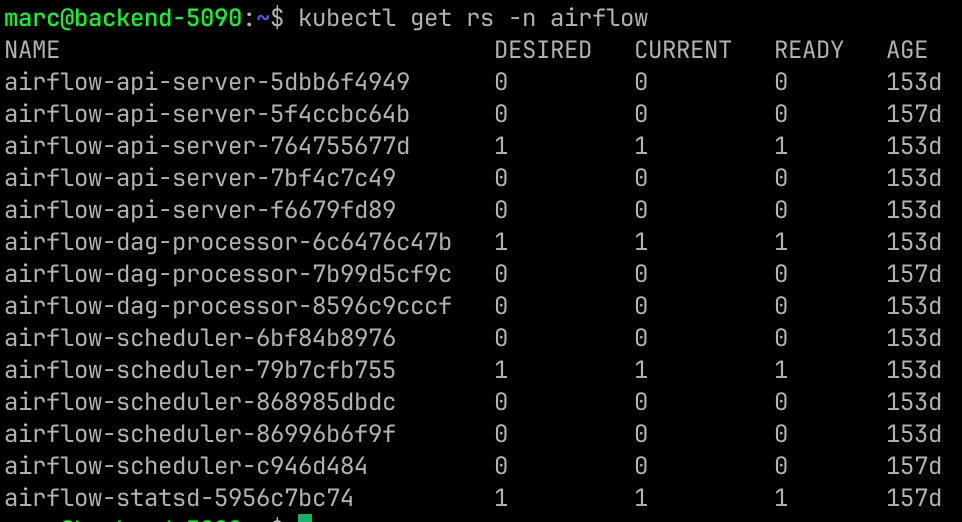
A Deployment manages ReplicaSets, and the ReplicaSet manages pods. A ReplicaSet is a counter with a job, keep exactly N copies of this pod running. Push a new image and the Deployment executes a rollout. It creates a new ReplicaSet for the new version and spawns the new version’s pods while shrinking the old version. I like to think of it as overfilling a glass of water, the new pods are the water being poured in, the water overflowing from the glass is the old pods dying, and the glass holding the water is the base number of pods. Of course, the readiness probe gates every step, so a bad version stalls while the old version keeps serving. The old ReplicaSets get scaled to zero and kept. They’re the undo history. kubectl rollout undo scales an older rollout back up. It’s the backup you keep after a migration, except the platform does it by default.
Node or Pod Scheduling
| Mechanism | Where | Error |
|---|---|---|
| resources (requests) | Pod | 0/2 nodes are available: 2 Insufficient cpu. |
| nodeSelector / affinity | Pod | 0/2 nodes are available: 2 node(s) didn't match Pod's node affinity/selector. |
| taints + tolerations | Node | 0/2 nodes are available: 1 node(s) had untolerated taint {node-role.kubernetes.io/control-plane: }. |
| PriorityClass | Pod | On the pod that lost, Preempted by a pod on node backend-5090. |
| topology spread | Pod | 0/2 nodes are available: 2 node(s) didn't match pod topology spread constraints. |
Scheduling failures aren’t mysterious, they’re spooky because it’s almost spooky season. A pod that can’t schedule sits in Pending, and kubectl describe prints the exact reason. Insufficient cpu, node didn’t match the node selector, untolerated taint. The scheduler tells you what is causing the error and where to fix it.
Debugging without reading the YAML
Everything above eventually reduces to a bad pod, and the diagnostic is about the pod’s state. kubectl get pods first, read the state, then pick the tool.
| State | Command | Information |
|---|---|---|
| Pending | kubectl describe pod x, read Events | Why won’t it run? The scheduler or storage rejected it, and the event says which. |
| CrashLoopBackOff / ImagePullBackOff | kubectl logs x --previous, then describe | Why did it die? BackOff means exponential retry, not giving up. |
| Running but broken | kubectl exec -it x -- sh, then nslookup and curl from inside, test the name, test the connection | Why doesn’t it work while running? |
I used the table above to debug fourteen bad YAMLs applied to my cluster without reading a manifest. The exercise is getting its own post. A handful of patterns from it route you faster once you’ve seen them.
Empty --previous logs plus exit 137. The OOM signature.
A clean stack traceback in the logs. App bug, not infra bug. Kubernetes ran your code perfectly. Your code was the problem.
A service with no endpoints. For a service problem, run kubectl get endpoints before anything else. An empty Endpoints list means the selector doesn’t match the pod labels. Compare --show-labels against the selector in describe svc and the typo falls out.
A probe on the wrong port or path. It kills a healthy app. If the liveness probe checks 8081 while the app listens on 8080, Kubernetes can’t know the pod is alive, so it restarts it.
A delete that hangs with no event trail. Usually a finalizer, a tag on the object flagging work that must happen before deletion, stuck because the controller responsible for that work is missing. kubectl get -o yaml to find it, kubectl patch it to null once you’re sure nothing needed it.
What two nodes can’t give you
My cluster is tiny. My control plane is one node. If the backend server dies there is no apiserver, no scheduler, no controllers. The pods already running on the surviving node keep running, the kubelet doesn’t need anyone’s permission to keep a process alive. But nothing new schedules and nothing heals until the control plane comes back. Real high availability means three control plane nodes. With three members it can lose one and keep a majority. With one member, losing the node loses the cluster’s brain.
I haven’t gotten to play with LoadBalancers either. It’s a fourth service type that works by asking a cloud provider to build a real load balancer in front of the cluster. There is no cloud behind bare metal, so a LoadBalancer service here sits Pending forever, waiting for a cloud that doesn’t exist. NodePort is my answer for traffic entering the cluster, and my firewall does the job a cloud load balancer would.
The translation table
The whole post in one table. The Kubernetes piece, the database thing I already knew, and where it lives in my cluster:
| Kubernetes | What I knew | Where it lives |
|---|---|---|
| etcd | The database | /etc/kubernetes/manifests/etcd.yaml |
| The apiserver as sole etcd writer | Single writer guarding the critical section | kube-apiserver.yaml, same folder |
| A Service | A connection string that survives failover | mysql-services.yaml |
| Headless DNS per pod | Pointing the replica at the primary by name | serviceName: mysql in the StatefulSet |
| SIGTERM then SIGKILL, 143 then 137 | Clean shutdown vs pulling the plug into crash recovery | The 30 second grace period on every pod |
| Reclaim policy Retain | Keeping the data files after the drop | fast-nfs-pv-sql0.yaml |
| Memory limits and the OOM killer | The buffer pool is incompressible, size it or lose it | The 8Gi/16Gi block in mysql-statefulset.yaml |
| RBAC roles and bindings | GRANT statements and SHOW GRANTS | airflow-spark-rbac.yaml |
| Zero scaled ReplicaSets | Undo history you can roll back to | kubectl get rs -n airflow |
Six months ago, everything in that table’s left column was a mystery and everything in the middle column was home. It turns out the distance between them was mostly vocabulary. Kubernetes is a transactional database with strong opinions about processes. I had to lose 13 hours at a time learning to read it.
The Rest of The Story
The replication setup MySQL runs on today is the StatefulSet post. The scheduler this cluster replaced, stored procedures and all, is the airflow post. What the analytical tables on this cluster are doing internally is Same Job, Two Engines. The Spark side of this cluster is the next post. Every YAML in this one is real and lives in the repo’s yaml directory if you want to see the whole cluster’s config up close.