I Deleted /etc/passwd on My NAS
On March 24th around 9pm, two weeks into my Linux journey on my homelab, I stupidly wiped /etc/passwd on the machine that holds every byte I own.
March 24th went something like this:
| Step | What happened |
|---|---|
| The mistake | sudo tee wrote to /etc/passwd instead of grep |
| The damage | NAS /etc/passwd wiped |
| The way back in | GRUB init=/bin/bash |
| The fix | Wrote a minimal passwd by hand |
| The cleanup | Middleware regenerated users on boot |
The change that made the incident possible happened earlier that day, SSH access to the NAS enabled for my user. What the table doesn’t show is that this was the fifth incident of that day. March 24th had already produced a firewall GUI crash before dawn, a morning of DNS resolver crashes, a physical switch port failing at lunch, and a GPU driver crash loop half an hour before this. By 9pm I was angry and impatient. My final chore was to read a file, and the command I ran cost me my night and my well being.
Two weeks into Linux, I thought tee was cat.
cat reads, tee writes
Understanding these commands is fundamental to working with Linux. cat opens a file and prints its content to the terminal. tee opens a file for writing, which truncates the previous content on the spot, then writes stdin into it. Point cat at /etc/passwd and you see the password file. Point tee at /etc/passwd and you replace the password file with whatever was flowing down the pipe, which in my case was gibberish. The best part is the truncation happens when the file opens, before you’ve had time to wonder why nothing is printed to the terminal.
I was trying to be fancy and use the cli instead of using the gui. The job in my head was a search, find something inside the password file, and the tool I grabbed had been filed under “reads files” since I was, and still am a noob. Run it under sudo, as I did, and you get to skip the permission check which is there to protect the system against people like me. I take responsibility for the failure, it was a command run as root on my most important machine when my whole model of it was “I’ve seen this near files before” and too much confidence.
There’s always another mistake
The machine told me almost immediately. TrueNAS started acting weird in ways I hadn’t experienced, and that, my friend, was my oh shit moment. What I couldn’t see, and what hindsight makes almost painful, is the state the system was in. It wasn’t dead, it was degraded. I’ve learned a Unix system is a collection of files with jobs, and /etc/passwd has one job, mapping names to identities. It’s checked during authentication, not continuously. So everything already authenticated stayed authenticated, services kept servicing, the containers kept containering, and the kernel didn’t care. My admin session was still open too, which made it the most valuable object in the house. From inside a live session I could probably have changed my password and let the platform’s middleware rewrite the file on its own. A two minute fix was sitting open in front of me.
But it seems like I never take the easy solution, on purpose or in this case by mistake. I rebooted my NAS. The reboot closed every live session, mine included, and brought the machine back up to a login checking a file with nobody left in it. Every pool, every share, the years of photos, all of it behind a login screen that no longer recognized any account. I thought I killed my NAS.
I’d like to think my two actions are sudo rm -rf *’s little sibling. tee emptied the authentication checker and the reboot killed the easiest way to undo my impressive work. I think it’s fair to say I’ve become a professional at bricking servers over the past year or so.
The fix
There were three steps I took to fix my NAS. Each step taught me something I didn’t even know existed. Looking back, this was totally why I bricked my NAS on purpose.
The first step was GRUB. After I had my panic meal from GRUBhub, I found out GRUB wasn’t only short for Grubhub, but was a bootloader that sat between the BIOS and the operating system. If the BIOS is fine and the operating system is the issue, GRUB seemed like a good place to start. I rebooted the system, edited the boot line, init=/bin/bash, and the kernel skipped the entire init system and I was in a root cli. Login and authentication were skipped, because they are not required for the kernel. That’s how I found out the login was an optional layer. I had learned GRUB existed about four minutes earlier.
My victory picture:
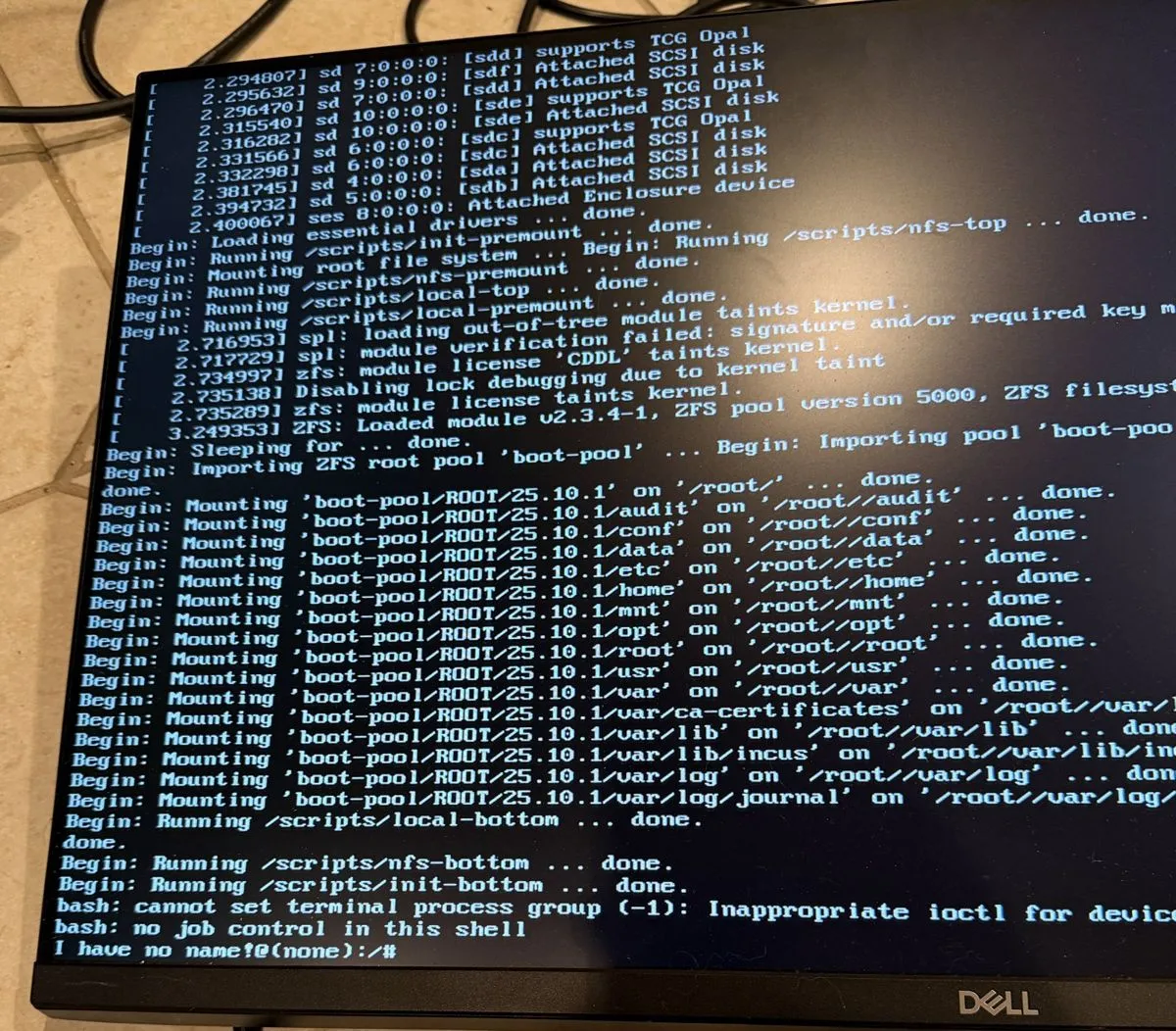
I have no name! is bash discovering it can’t answer its own first question. The prompt asks the password file who uid 0 is, gets nothing, and prints its confusion, it was the first time I felt bash and I were on the same page. The shell still had root’s powers. It just couldn’t look up its own name.
I even tried the backup:
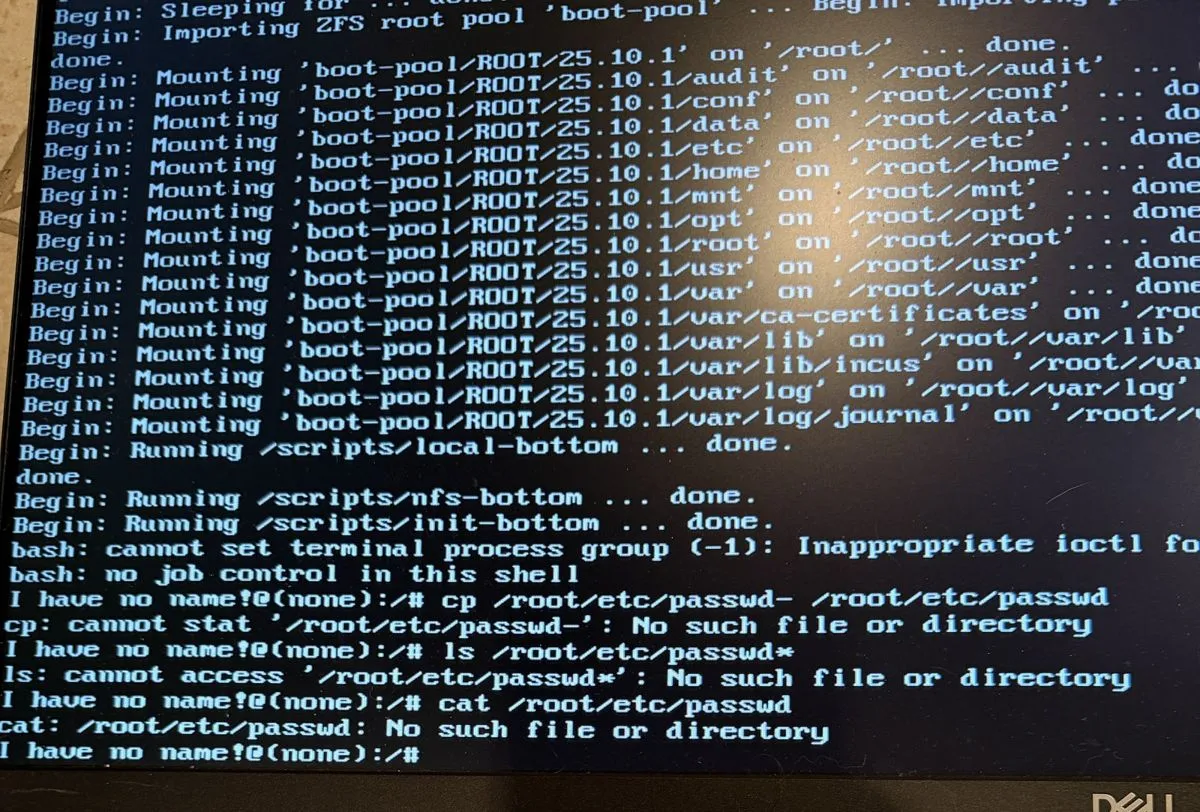
Three failed attempts. The passwd- backup comes from tools like vipw, and nothing on my NAS ever created the backup. cat showed me the file was missing, not empty. The file is created at boot by the middleware, and in a bare shell where middleware has not run yet, there was nothing on disk. Following the theme of this post, I couldn’t tell you when the file was removed. This means backups weren’t an option. The /root/etc/ prefix on every path is this shell running before the system pivots to its real root.
The most annoying step was the second one. I wrote a minimal /etc/passwd by hand and set a password of my own choosing, just enough for a real boot. To my surprise, it actually worked. The machine came up and I logged in with the credentials from my custom /etc/passwd. The TrueNAS middleware created its managed users on that boot, since the majority of /etc/passwd is derived state, projected from the platform’s configuration database. Part of the file I had spent the evening mourning was a build artifact the whole time. If only I knew that several hours earlier.
The third step was a successful version of my original panic reboot. I rolled the system back to a snapshot taken before I experimented with tee, and my NAS ran like the experiment never happened.
tee is not for me, well maybe
That night I decided against using tee ever again. One experiment with tee resulted in one too many panic attacks.
Here’s the kicker, for my firewall’s shell, I have to use tee. pfSense runs tcsh, and under tcsh a sudo only privileges the command itself, not a > redirection after it, so redirecting output into a system file fails and the solution for writing files as root is printf | tee.
The tool I was terrified of on my NAS was the solution to a problem on my firewall. tee works great and it’s a tool that does exactly what it says, the issue was I didn’t know what tee says. The lesson I learned should have been common sense, don’t run anything as root that you can’t explain. root removes every safety net, and I removed the safety net after two weeks.
/etc/passwd was the file that I caused the chaos on. It is a cool file to have destroyed, because the recovery showed me the system was never the fragile monolith I’d imagined. It’s parts, with jobs, and parts can be put back. This sounds like a compelling argument to use microservices to build applications, doesn’t it? That’s how I learned what tee does in a way that sticks.